 Admin

Overview
PHP powers a large amount of the web, with it being used to run dynamic websites, CMS, e-commerce and business applications. Due to this any issues with the runtime of PHP can affect more than one website/application.
In October 2026 two critical issues were announced with the name PHP2Shell (CVE-2026-109618 & CVE-2026-109619). The vulnerability affects how memory is handled and the internal request state. If exploited it could allow remote code execution and leaking of sensitive memory. Please ensure you check the details from the official advisories and apply patches to affected instances.
What is PHP2Shell?
PHP2Shell is the name given to two critical vulnerabilities in the core runtime of PHP. These aren’t just issues with a WordPress theme/plugin but relate to how the request and memory are handled internally. Simply updating your application won’t help.
- Remote Code Execution
- Data leaks from process memory
- Risk to applications/data on the affected system
- Further actions could take place if the server is compromised.
Understanding the Vulnerabilities
CVE-2026-109618 - OOM Handling
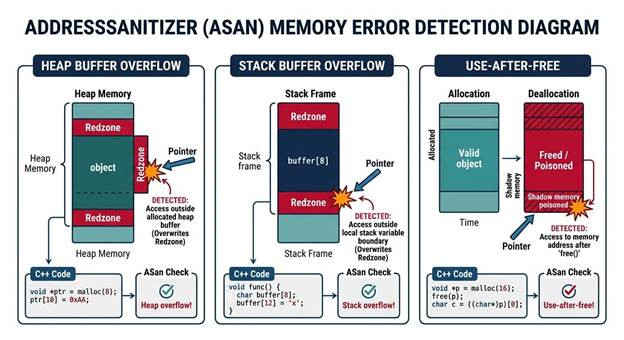
This relates to how PHP handles an out of memory (OOM) situation. On certain paths the request could be interrupted with the internal memory only partially initialised. This can cause invalid states to be read from clean up routines. This could cause memory corruption and allow for remote code execution in applicable situations.
CVE-2026-109619 - Stale State / Use After Free
This is where the internal state could still be referencing the memory of the request even though it has been freed. If another process is executed it could attempt to read the reference before it has been properly initialized. This could cause unexpected behavior and could have serious security implications.
Attack Scenario
High level overview of what could happen.
- An attacker finds a publicly accessible server running an affected PHP runtime.
- They send a malicious request to attempt to trigger the issue.
- PHP will trigger the appropriate memory or request state issue.
- If successful the attacker could execute code or read sensitive memory.
This is a high level overview and not guaranteed to work on all vulnerable installations. The exposure would depend on the PHP build, deployment, configuration and request handling.
What could be affected?
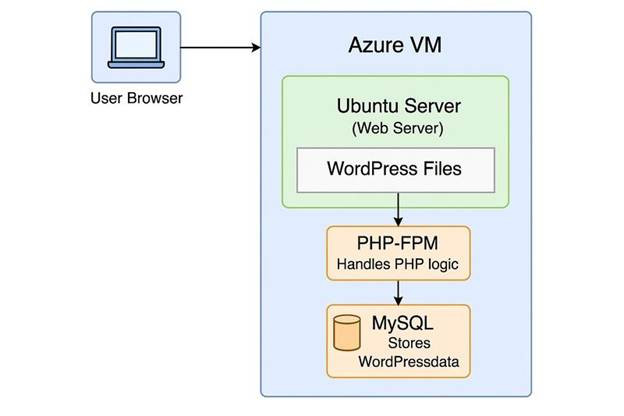
PHP can be used in a variety of web serving environments. This includes PHP-FPM, Apache (mod_php), CGI, LiteSpeed & others. Applications that could be affected include WordPress, Drupal, Joomla, Magento, bespoke PHP sites, business portals and APIs. However it depends on the actual runtime being used to serve each site. Please check with your admin.
Affected Versions & Patches
The versions affected & patched can be seen below. Please ensure you check these versions and any future security updates before publishing. Please refer back to the official PHP Security Archive and your hosting or OS vendor. Any older end of life branches may need to be upgraded to a supported PHP branch.
How to Secure Your Website
1. Find All PHP Instances
If you have PHP CLI installed run:
php -v
This will show you what version of PHP is installed on your command line. This may not match what is used to serve your website. Please also check your hosting control panel, PHP-FPM pools, web server config, containers, staging sites, APIs and background workers.
2. Install the correct security patch
Ensure you upgrade PHP using the official PHP distribution or your hosting providers method. If possible, test in a staging environment. Ensure you have a backup of critical data. Follow the vendors deployment method.
3. Restart Services & Confirm
Depending on your deployment you may need to restart or reload PHP-FPM and other services. Ensure your web server is running the patched runtime. Just upgrading PHP CLI may not upgrade the runtime used for your website.
4. Check Logs
- Web Server Logs
- PHP Logs
- Unexpected file changes
- Unusual outgoing connections
- Unusual authentication/administration activity
5. React to Possible Compromise
If you have any valid indicators of exploitation then treat this as a possible compromise of the server. If appropriate isolate the system. Ensure you preserve evidence. Investigate for persistence. Rotate any credentials that could have been exposed from a clean environment. Depending on what you find you may need to rebuild from a trusted image.
6. Check Entire Hosting Environment
Check your subdomains, staging, containers, APIs and any other services. Even if your main website is patched there could still be one unpatched PHP instance that could be exploited.
Can I Disable a Feature in PHP?
Any changes to the configuration may reduce the risk of this specific attack vector but shouldn’t be considered as a complete solution. Please ensure you check the latest official advisory for any temporary fixes. It is important that you apply the correct security patch. If you can’t patch a vulnerable public facing service quickly then consider isolating or turning it off based on a risk assessment.
WordPress Website Owners
- Check what version of PHP is allocated to your site from your hosting control panel.
- Ask your hosting provider to confirm all PHP runtimes serving your site are patched.
- Update WordPress core, themes & plugins using normal maintenance methods.
- Check logs for any suspicious activity.
- Check your staging sites, subdomains and any other PHP applications on the same account.
Just updating WordPress won’t fix the PHP issue. Security depends on the entire hosting stack.
FAQ
What is PHP2Shell?
PHP2Shell is the name given to two reported issues in PHP (CVE-2026-109618 & CVE-2026-109619). They could introduce risks such as remote code execution or sensitive memory exposure.
Can WordPress websites be affected?
Yes if running an affected version of PHP. This will depend on your hosting environment and PHP version.
Will updating WordPress fix PHP2Shell?
No. The PHP runtime needs to be upgraded. Whilst it is important to update your applications this won’t help with the PHP issue.
Can I completely prevent this attack with a firewall?
Whilst a firewall can reduce risks it shouldn’t be considered as a complete solution. Please follow the official PHP remediation guidance.
What if my site was exposed before applying patches?
Apply patches as soon as possible. Consider whether exploitation occurred. Check logs and look for any suspicious activity. If compromised follow incident response procedures.
Conclusion
PHP2Shell shows how issues in fundamental software can expose a lot of websites. Website owners, developers, hosting providers and IT teams should identify any vulnerable PHP instances, apply the correct security patches and ensure they are deployed correctly. Keeping your entire software stack up to date is vital for website security.
Continue Learning with IT Academy Pro
Increase your cybersecurity knowledge with IT Academy Pro. Explore our learning resources to improve your knowledge of network security, vulnerability management, secure systems administration and incident response. Visit https://lms.itacademypro.com/ to see what courses we have available.
References
- PHP Security Archive: https://www.php.net/archive/2026.php
- Security Advisories for PHP Source Code: https://github.com/php/php-src/security/advisories
- Check security advisory and package updates from your hosting provider.
Comments (0)
Share your thoughts about this article.
No comments yet. Be the first to comment!
No comments yet. Be the first to comment!